

// introduction
I’m Chase Monaghan, and I built the DukePaw Studio website from scratch. Not from a template. Not from a drag-and-drop builder. From actual code — component by component, animation by animation, decision by decision.
This case study is a look behind the build. I want to show you what went into the site, why specific technical and design decisions were made, and what that process reveals about how I approach every project that comes through DukePaw Studio. Because the way I built my own site is the same way I build for clients — with intentionality, craftsmanship, and zero shortcuts.
If you’re a business owner evaluating agencies, this will give you a clear picture of what “real development” looks like — as opposed to the themed WordPress installs that most agencies pass off as custom work.
// the_brief
What the Site Needed to Communicate
DukePaw Studio is not a design agency that happens to do some development. We are a full-stack development studio that builds websites, software, automation systems, and the infrastructure around them. The website needed to communicate that clearly — without saying it in a paragraph of corporate filler.
The requirements were specific:
- →
Signal technical depth immediately — before anyone reads a word
- →
Feel premium, polished, and intentional — not like a startup template
- →
Show the breadth of our stack without turning the homepage into a résumé
- →
Build trust through visible craftsmanship, not through stock photos and testimonial carousels
- →
Perform flawlessly — fast loads, smooth animations, strong SEO, proper security
- →
Work beautifully on every screen size
That last point is non-negotiable. A development studio whose own site is slow, broken on mobile, or poorly structured has already lost the argument. The site had to be proof of capability, not just a claim of it.
// design_direction
The Code Editor Aesthetic — And Why It Works
The entire site is designed around a code-editor aesthetic. Dark backgrounds. Monospace typography. Syntax highlighting colours. Terminal-styled components. Line numbers. Comment-style section tags. If you have ever spent time in VS Code, the visual language will feel instantly familiar.
This was not a decorative choice. It was a brand decision. DukePaw Studio’s core identity is engineering — and the design language needed to reflect that. Most agency sites go for generic corporate aesthetics or trendy minimalism. Neither of those communicates what we actually do. The code-editor theme says, immediately and without explanation: “this studio writes real code.”
The colour palette is pulled directly from popular editor themes — the same syntax highlighting colours that developers see every day:
Keywords
Purple
Strings
Green
Functions
Blue
Variables
Orange
Brackets
Cyan
Special
Gold
These colours are not random. They create visual consistency across every page, every component, and every interactive element. When a visitor sees a gold-highlighted line in the code rain or a purple accent on a service card, those colours carry meaning — and they feel intentional rather than arbitrary.
// the_stack
The Stack — And Why Every Choice Was Deliberate
The DukePaw website runs on a modern, production-grade stack. Every technology was chosen for a specific reason — not because it is trendy, but because it solves a real problem well.
Next.js 16 (App Router) — Server components for SEO metadata, client components for interactivity, file-based routing, and static generation for performance. The App Router gives us granular control over what runs on the server and what ships to the browser.
React 19 — The latest React with the React Compiler enabled for automatic memoisation. This means better runtime performance without manual optimisation — the compiler handles it.
TypeScript — Type safety across the entire codebase. Every prop, every function, every API response is typed. This catches bugs at build time, not in production.
Tailwind CSS 4 — Utility-first styling with zero runtime CSS. Every component is styled with atomic classes — no bloated stylesheets, no CSS-in-JS overhead, no specificity wars.
Framer Motion — Physics-based animations and gesture handling. Every page transition, hover state, stagger animation, and interactive element uses Framer Motion with a custom easing curve tuned for a premium feel.
Fira Code + Geist + Poppins — A deliberate typography stack. Fira Code for all code-styled elements, Geist for UI text, and Poppins for display weight. Loaded through next/font for zero layout shift.
Performance Detail: React Compiler
The site runs with reactCompiler: true in the Next.js config. This enables automatic memoisation of components and hooks — meaning the browser does less re-rendering without me having to manually wrap everything in useMemo and useCallback. It is a meaningful performance win, especially on animation-heavy pages.
// architecture
How the Codebase Is Structured
Clean architecture is not something users see — but it is something they feel. A well-structured codebase means faster development, fewer bugs, easier maintenance, and better performance. Here is how this project is organised:
src/
├── app/            // Routes + server components (metadata)
│   ├── page.tsx      // SEO metadata lives here
│   ├── HomeClient.tsx // Client-side interactivity
│   └── layout.tsx    // Root layout + JSON-LD schemas
├── components/
│   ├── ui/          // Reusable UI (Button, CodeRain, TechBelt...)
│   └── layout/      // Header, Footer, MobileNav
└── lib/
    ├── constants.ts  // Single source of truth
    └── animations.ts // All motion variants
The key pattern here is the server/client split. Every route has a server component ( page.tsx) that handles SEO metadata, structured data, and static generation. The interactive UI lives in a separate client component ( *Client.tsx). This means search engines get full metadata without waiting for JavaScript, while users get rich interactivity once the page hydrates.
Animation variants are centralised in a single animations.ts file. Every fade, slide, stagger, and page transition across the entire site pulls from the same set of tuned variants with a shared custom easing curve: [0.16, 1, 0.3, 1]. That consistency is what makes the site feel cohesive rather than thrown together.
// homepage_design
The Homepage — First Impression by Design
The homepage has one job: make you understand, within seconds, what DukePaw Studio is and what standard of work to expect. No sliders. No stock photos. No generic hero text over a blurred background.
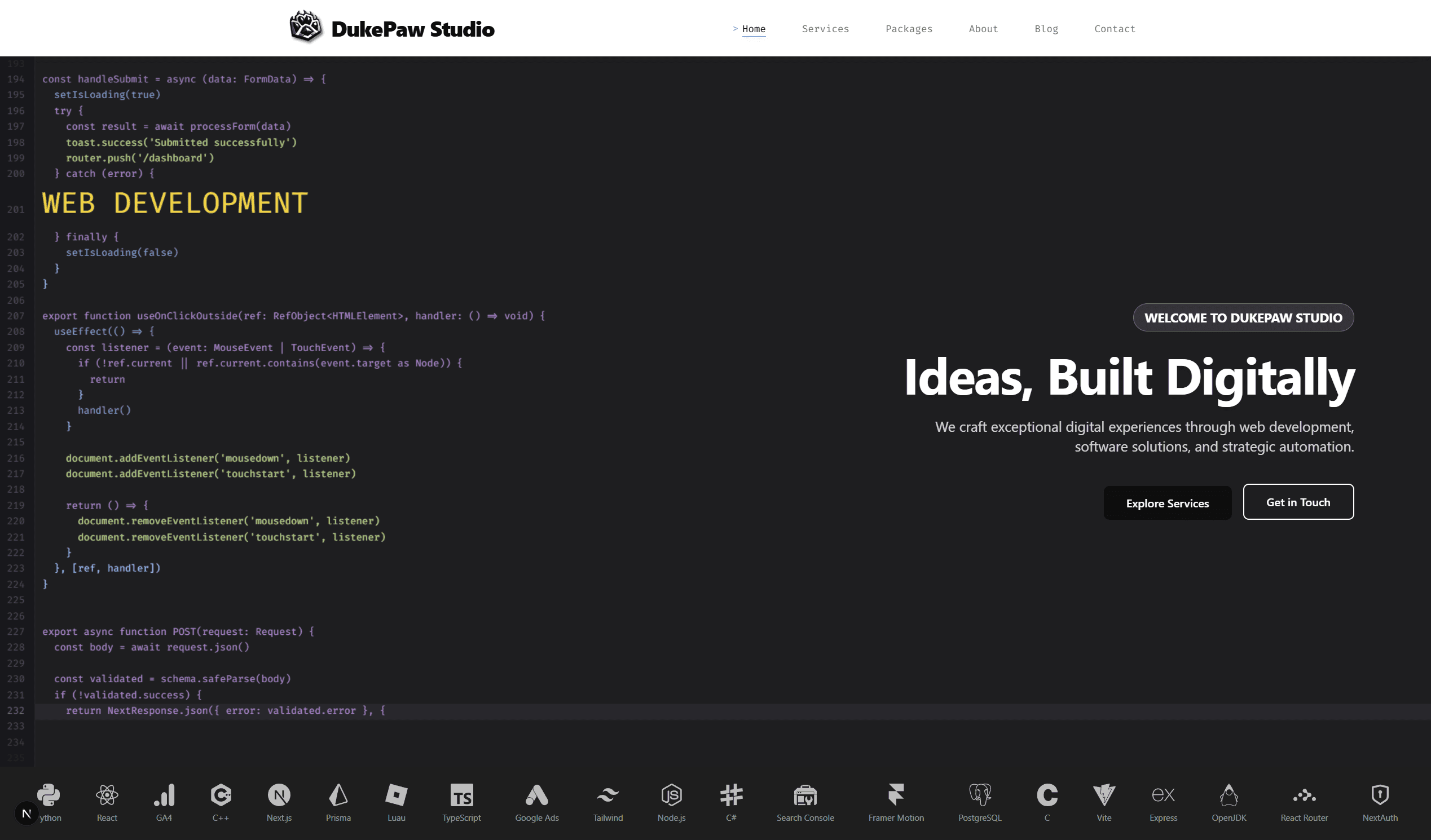
Instead, the first thing you see is a full-viewport code editor — real TypeScript code being typed in real time, character by character, with syntax highlighting, line numbers, and a blinking cursor. That is the CodeRain component, and it is the single most important visual element on the site.
Overlaying the code rain is the hero content: a staggered entrance animation that reveals the DukePaw Studio badge, the tagline “Ideas, Built Digitally,” a concise value proposition, and two call-to-action buttons. The content is right-aligned on desktop, leaving the code rain visible on the left — so the visitor reads the message while simultaneously watching the craft in the background.
Below the hero, a TechBelt component displays 21 technology icons — our actual working stack. On desktop, it behaves like a macOS dock: icons scale up with spring physics as your cursor moves across them. On mobile, it becomes a clean grid. This is not decoration. It is proof of range.
// code_rain_deep_dive
Inside the Code Rain — How It Actually Works
The code rain is not a video. It is not a GIF. It is not a pre-rendered animation. It is a live, procedurally generated canvas animation running at 60fps in your browser.
Here is how it works, from the inside out.
The Dual-Canvas Architecture
The component uses two overlapping HTML canvases — one for the main code rendering, and a second transparent canvas layered on top for special highlighted lines. This separation means branded messages (rendered in gold at 3x font size) can appear above the code without interfering with the main rendering loop.
const canvasRef = useRef<HTMLCanvasElement>(null);
const specialCanvasRef = useRef<HTMLCanvasElement>(null);

// Main canvas: code lines, line numbers, gutter
// Special canvas: gold branded messages at 3x size
// Layered with z-index — special renders on top
Procedural Code Generation
The code being typed is not hardcoded. On mount, a generateCodeFile() function assembles a ~1,000-line TypeScript file from categorised templates — imports, interfaces, functions, components, API routes, hooks, variables, and control flow statements. Each run produces a different arrangement, so the animation never looks exactly the same twice.
const CODE_TEMPLATES = {
  imports:     // 13 Next.js/React import patterns
  interfaces:  // 7 TypeScript interface definitions
  functions:   // 7 async/hooks/utility functions
  components:  // 3 React component patterns
  apiRoutes:   // 4 CRUD API route handlers
  hooks:       // 3 custom React hooks
};

// Assembled randomly on mount — never the same twice
Real Syntax Highlighting on Canvas
Each line of code is colour-coded using the same logic a real code editor uses — keywords get one colour, strings another, functions another. This is what makes the animation look like a real editor rather than random scrolling text. The colouring function checks for language patterns using regex matching:
const getCodeColor = (text: string) => {
  if (isSpecialLine) return "#ffd700";  // Gold for branded lines
  if (hasQuotes) return colorScheme.string;   // Green
  if (isKeyword) return colorScheme.keyword;  // Purple
  if (isFunction) return colorScheme.function; // Blue
}
Mouse Interaction — The Glow Effect
When you move your cursor over the code rain, a subtle radial glow follows your mouse. Lines near the cursor get a faint text shadow, and a soft blue gradient radiates from the pointer position. This makes the animation feel alive and responsive without being distracting.
// Radial gradient follows the cursor
const gradient = ctx.createRadialGradient(
  mouse.x, mouse.y, 0,  // Inner radius
  mouse.x, mouse.y, 120 // Outer radius
);

gradient.addColorStop(0, "rgba(82, 139, 255, 0.06)");
gradient.addColorStop(1, "rgba(82, 139, 255, 0)");

// Subtle. Responsive. Not distracting.
The Hidden Messages
At specific line intervals throughout the code rain, gold messages appear at triple size: SINCE 2015, IDEAS, BUILT DIGITALLY, WEB DEVELOPMENT, SOFTWARE DEVELOPMENT, and more — each one a DukePaw service. They scroll past like Easter eggs buried in the code, rewarding visitors who watch the animation for a few seconds. It is branding that does not feel like branding.
// security_and_performance
Security and Performance — The Invisible Foundation
A website can look stunning and still be poorly built underneath. The DukePaw site ships with production-grade security and performance configuration that most agency websites never bother with:
- ✓
Strict-Transport-Security (HSTS) with a 2-year max-age and preload — enforcing HTTPS at the browser level
- ✓
X-Frame-Options set to SAMEORIGIN — preventing clickjacking attacks
- ✓
X-Content-Type-Options set to nosniff — stopping MIME type sniffing vulnerabilities
- ✓
Referrer-Policy set to origin-when-cross-origin — controlling what information gets shared with third parties
- ✓
Permissions-Policy blocking camera, microphone, and geolocation — reducing the attack surface
- ✓
poweredByHeader disabled — no free fingerprint for attackers to identify the framework
These are not optional extras. They are table stakes for a professional web build. Every client project we deliver through web development and managed hosting ships with the same security baseline — because your visitors deserve a site that protects them, even if they never notice it.
// seo_implementation
SEO That Goes Beyond Meta Tags
The DukePaw website does not just have “good SEO.” It has layered, structured, technically correct SEO that gives search engines exactly what they need to understand and rank every page.
- →
JSON-LD structured data on every page — Organization, WebSite, ProfessionalService, Article, FAQ, and BreadcrumbList schemas
- →
Server-rendered metadata — titles, descriptions, Open Graph, and Twitter Cards generated at build time, not injected by JavaScript
- →
Canonical URLs on every page — eliminating duplicate content signals
- →
Programmatic sitemap and robots.txt — automatically maintained as pages are added
- →
Image optimisation through next/image — automatic format selection, lazy loading, and responsive sizing
- →
Geo-targeted local SEO — schema includes service areas, coordinates, and regional keywords
If you want to understand more about how these fundamentals work in practice, our beginner’s guide to SEO breaks it down from the ground up.
// micro_interactions
The Details You Feel but Might Not Notice
Premium digital work is defined by the details that most people do not consciously notice — but that collectively shape how a site feels. Here are some of the micro-interactions built into the DukePaw website:
- 01
Scramble text navigation. Every nav link randomises its characters on hover before resolving back to the correct text — like a terminal decoding a command. A blinking cursor appears beside it, and a gradient underline tracks your mouse position with spring physics.
- 02
macOS dock-style tech belt. The technology stack icons at the bottom of the hero scale up as your cursor approaches them — using Framer Motion springs with tuned mass, stiffness, and damping values. On mobile, they fall back to a clean static grid.
- 03
Staggered entrance animations. Every section enters the viewport with a staggered reveal — children animate in sequence with 150ms delays, using a custom cubic-bezier curve that feels natural rather than mechanical.
- 04
Edge fade on the code rain. Lines near the top and bottom of the code rain canvas fade in opacity — preventing a hard visual cut and creating a sense of depth, as if the code extends beyond the visible window.
- 05
Code-style section tags. Throughout the site, section headers are preceded by monospace comment tags like // discovery or // site_vitality — reinforcing the code-editor aesthetic at every scroll position.
// what_this_reveals
What This Build Says About How I Work With Clients
I built the DukePaw website the same way I build every client project. The process, the standards, and the attention to detail are identical. There is no “agency version” and “client version” of quality.
What this case study reveals is the approach:
- →
Strategy first — every design and technical decision starts with the business goal, not the trend
- →
Full-stack execution — I handle design direction, frontend engineering, animation, backend architecture, SEO, security, and deployment. One person. One standard. No handoff gaps.
- →
Performance is not an afterthought — it is engineered into the stack from the first commit
- →
Brand is expressed through craft, not through stock imagery and marketing copy
- →
The work continues after launch — through Site Vitality, every site gets ongoing care, updates, monitoring, and optimisation
If you are evaluating agencies or developers, this is the standard I hold myself to — and the standard I bring to your project. Whether it is a website build, a software platform, or a full automation and hosting setup, the process is the same: discover, scope, build, and then keep it running through Site Vitality.
// final_thoughts
Final Thoughts
The DukePaw Studio website is not just a marketing page. It is a working demonstration of the full-stack capability, design thinking, and engineering standards that define every project that comes through this studio. I built it to be proof — not a promise.
If you are a business looking for a development partner who treats your project with the same care they put into their own flagship — I would be glad to have that conversation. If you want to see what this kind of thinking costs, our website cost breakdown is transparent. And if you want to understand the technology choices behind modern web builds, our tech stack guide covers that in detail.
// frequently_asked_questions
Frequently Asked Questions
What tech stack is the DukePaw Studio website built with?
The DukePaw Studio website is built with Next.js 16 (App Router), React 19, TypeScript, Tailwind CSS 4, and Framer Motion. It uses the React Compiler for performance optimisation and is deployed with comprehensive security headers.
What is the code rain animation on the DukePaw homepage?
The code rain is a custom dual-canvas animation that renders a procedurally generated TypeScript codebase in real time. It types line by line with syntax highlighting, embeds branded messages at key intervals, and responds to mouse interaction with a radial glow effect.
How was the DukePaw website designed?
The design follows a code-editor aesthetic throughout — monospace typography, syntax highlighting colour palettes, terminal-styled components, and dark backgrounds. This was a deliberate brand decision to signal technical credibility while remaining commercially accessible.
Who built the DukePaw Studio website?
The DukePaw Studio website was designed and built by Chase Monaghan, founder of DukePaw Studio. Chase handled the full stack — design direction, frontend architecture, animation engineering, SEO implementation, security configuration, and deployment.
Does DukePaw Studio build client websites the same way?
Yes. The same process, technical standards, and attention to detail that went into the DukePaw website is applied to every client project — from discovery and scoping through to build, deployment, and ongoing care through Site Vitality.